
Why accessibility auditing and testing matters for learning content
In many organisations, accessibility is still viewed primarily as a compliance task. At eLaHub, we take a different view. We know that learning developed with accessibility in mind from the outset ensures a better experience for all learners and ultimately improves learning outcomes.
Digital learning is only effective when learners can use it. If a significant proportion of your audience cannot access the content, navigate through it successfully or complete the required activities, the course will not achieve its purpose. Accessibility is therefore central to the value and effectiveness of the learning.
“For organisations investing in digital learning, accessibility is a key consideration. It has a direct impact on learner confidence, performance and outcomes.”
Accessibility audits play an essential role in improving the quality of your learning content. By undertaking a detailed assessment to understand what works and what doesn’t, you can prioritise the best ways to implement change so that your learning content works for everyone.
Accessibility testing is an integral part of the auditing process, but is equally important to include throughout development, so that accessibility is not an afterthought but a natural part of the workflow. This will improve the quality of the final learning and avoid the need for costly rework later.
In this guide, we explain the process of accessibility audits, and how to start incorporating accessibility testing as part of your default workflow

What is an eLearning accessibility audit?
An accessibility audit is a structured evaluation of digital learning content against recognised accessibility standards and best practice. For digital learning, this is usually informed by the Web Content Accessibility Guidelines, known as WCAG, alongside practical testing of how learners access, navigate and interact with the content.
Its purpose is to:
- Establish a clear accessibility baseline
- Identify barriers that affect learners with diverse access needs
- Assess compatibility with assistive technologies
- Provide practical recommendations for improvement
A high-quality audit will not just list issues, it will also translate standards into meaningful, actionable insight.

Why organisations invest in accessibility audits
Organisations invest in accessibility audits for a range of reasons.
With increasing global accessibility expectations, legal and regulatory requirements, many countries now require digital content to meet accessibility standards. As the majority of accessibility laws are underpinned or aligned to the Web Content Accessibility Guidelines (WCAG), organisations may need evidence of compliance with WCAG to demonstrate that they meet their legal obligations or the requirements of their clients.
As we discuss in our ultimate guide to digital Accessibility in the workplace, it is also the case that organisations are now recognising that a commitment to accessible learning reduces reputational, operational, and legal risk, particularly at scale.
“However, the most important reason for an organisation to invest in an accessibility audit is to improve the quality of their learning content.”
The outcome of addressing accessibility issues is that learning becomes clearer, easier to navigate and more usable for everyone. By highlighting recurring issues, not just isolated incidents, audits can also support continuous improvement and help organisations build more consistent and effective learning over time.

A simple explanation of accessibility standards
The WCAG standards provide the main technical reference point for assessing the accessibility of digital learning content. The most up to date version WCAG 2.2, was updated in 2024. The WCAG standards are developed by the Web Accessibility Initiative (WAI) part of the World Wide Web Consortium (W3C).
At their core are four principles:
- Perceivable. Learners must be able to access content through sight, sound, or alternatives
- Operable. Learners must be able to navigate and interact with the content
- Understandable. Content must be clear and predictable
- Robust. Content must work with assistive technologies
These principles are supported by testable success criteria, grouped into three levels:
- Level A – basic requirements.
- Level AA – the expected standard for most organisations
- Level AAA – advanced criteria and often not fully achievable across all content
Most legislation requires conformance to Level AA, which means meeting all Level A and Level AA criteria.
Addressing concerns about eLearning accessibility audits
An accessibility audit should not feel like a fault-finding exercise. At eLaHub, we see it as a practical tool for improving digital learning, supporting practitioners and creating better outcomes for learners.
Historically, many learning teams have had to rely on website accessibility specialists to audit learning content. While their technical expertise is valuable, they may not always have experience of Learning and Development, learning design or the authoring tools used to create digital learning. This can result in technical reports that focus heavily on coding issues practitioners have little control over. It can also lead to effective learning content and interaction being removed unnecessarily in the name of accessibility.
A good audit does more than identify where accessibility standards are not being met. It helps organisations understand priorities, make informed decisions and build accessibility into the development process. It should give practitioners practical advice, clear options and realistic remediation approaches, especially where there are organisational, system or tool constraints to navigate. These might include brand colours that must be used, templates that cannot easily be changed or limitations within the authoring tool.
This broader approach is reflected in our eLaHub audit process. WCAG standards are essential, but they are technical standards. They focus on whether content is technically accessible, not necessarily whether it supports a good learner experience. Alongside WCAG, we draw on wider guidance, including guidance from organisations such as the British Dyslexia Association, WebAIM and GOV.UK. This helps us make recommendations that improve usability, accessibility and the overall effectiveness of the learning content.
When carried out in this way, an accessibility audit becomes a positive and empowering process. It can increase confidence, support better decision-making and help practitioners test, fix and improve existing content, while also strengthening the accessibility of future learning.
Who should audit?
A robust and effective accessibility audit of eLearning content requires more than checking technical compliance.
Auditors need:
- A thorough understanding of accessibility standards and how they should be evaluated
- Expertise in learning design, so the audit considers the learner experience and the required learning outcomes
- Experience with eLearning authoring tools, so they understand the development process, tool functionality and common constraints
- An understanding of any key system, financial or organisational constraints that may affect remediation options
This ensures the audit reflects the realities of digital learning design, as well as the requirements of accessibility standards. It also helps make sure that any recommended solutions are practical, appropriate and achievable.
The importance of Accessibility Conformance Reports (ACR)
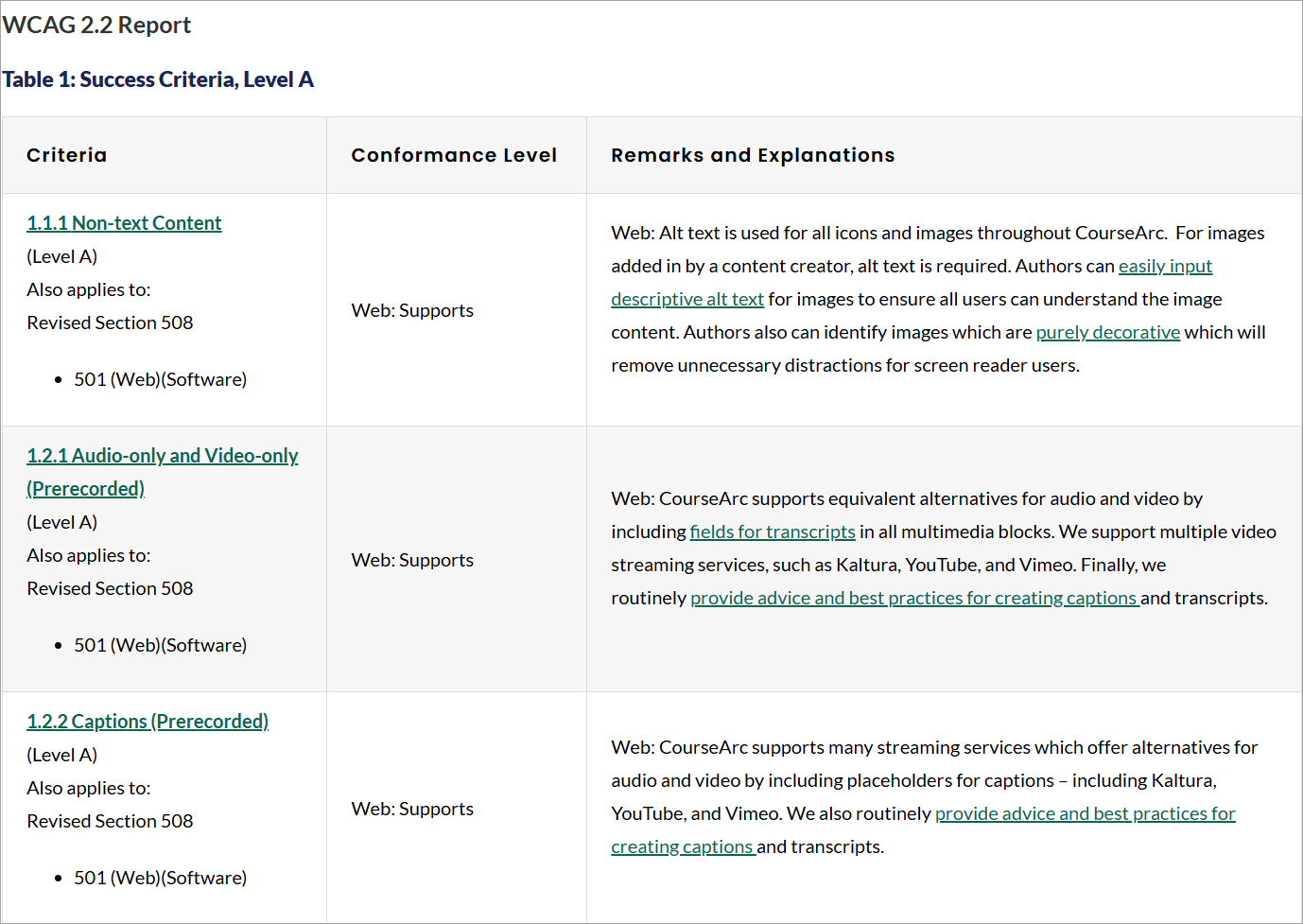
A WCAG 2.2 Accessibility Conformance Report (ACR) for the CourseArc authoring tool presented as a table. The table is titled “Success Criteria, Level A” and has three columns: Criteria, Conformance Level, and Remarks and Explanations.
The visible rows cover requirements for non-text content, audio-only and video-only content, and prerecorded captions. Each criterion is shown as a linked heading in the left column, the middle column states that the web version supports the requirement, and the right column explains how CourseArc addresses it. The explanations refer to features and guidance such as alternative text for images, transcripts for multimedia, and captions for video content.
As discussed previously, learning practitioners may need to work within several accessibility constraints when creating and delivering digital learning content. These often include the authoring tools and learning platforms used to build, publish and host the learning.
This is where an Accessibility Conformance Report, (ACR), can become an important part of the audit process. An ACR is a formal document that sets out how well a product conforms to recognised accessibility standards. It is based on a Voluntary Product Accessibility Template (VPAT) which gives suppliers a structured way to report how their product conforms.
For authoring tools and learning platforms, it can help practitioners understand where the product supports accessibility well and where there may be known limitations.
Here are some examples of the Accessibility Conformance Reports of some popular authoring tools:
- Articulate Storyline 360 Accessibility Conformance Report
- Articulate Rise Accessibility Conformance Report
- DominKnow One Accessibility Conformance Report
- ELB Learning – Lectora® Accessibility Conformance Report
- CourseArc Accessibility Conformance Report
Not all authoring tools or learning platforms provide an ACR. Where one is available, it is a useful document to review. However, an ACR is only valuable if it is credible and can be trusted.
When reviewing an ACR, it is important to look for cues that show how the evaluation has been carried out. These include a clear description of the evaluation process, evidence of independent external testing, a combination of manual and assistive technology testing, and confirmation of which VPAT version has been used.
These details help practitioners sense check whether they can rely on the ACR and use it meaningfully as part of the audit process.
This matters because practitioners will usually have some control over the configuration, design and content of their learning, but they may be limited by the functionality of the tool. Reviewing the ACR and its credibility cues can help identify whether specific accessibility issues are caused by content design decisions, platform settings or limitations in the underlying tool.
During an audit, this distinction is important. Understanding the source of an issue helps determine what remediation is realistic, what can be changed within the content and where an alternative approach, workaround or supplier conversation may be needed.
The accessibility audit process
The accessibility audit process will vary between organisations, but a comprehensive audit should follow a clear and structured approach. This helps ensure that the audit considers technical accessibility, learner experience, practical constraints and realistic remediation options.
Preparation and context review
At the start of the audit process, it is important to carry out an initial review of the learning content and any relevant background information. This helps the auditor understand the content, scope, purpose and context of the learning.
This should include reviewing any ACR, for the authoring tools and learning platforms used. It should also include consideration of any technical constraints, such as whether practitioners can make changes to the underlying code of the learning, or whether they are limited by the functionality of the authoring tool, templates or platform.
Testing against WCAG standards
The eLearning content should be tested using a range of strategies. These may include:
- Manual checks, such as timing, consistent labelling and navigation
- Basic tool checks, such as colour contrast testing
- Keyboard testing, to check that the learning and all interactions can be navigated and completed using a keyboard alone
- Assistive technology testing, including testing with screen readers
- Each issue identified should be documented with screenshots and enough detail to show where the issue occurs and how it affects the learning content.
Issues should then be cross-referenced with the relevant WCAG criteria. This will usually include:
- Identifying the relevant success criterion, such as 1.4.3 Contrast
- Reviewing WCAG examples, techniques and failure guidance to confirm whether the issue represents non-conformance
- Retesting the learning content where needed, to check that the issue has been correctly identified
- Assigning a severity rating once the issue has been verified, so that remediation can be prioritised
- Considering possible ways to remediate the issue
At eLaHub, we normally categorise any failure of a WCAG Level A criterion as high priority, because Level A covers the most essential accessibility requirements. Failures of Level AA criteria are usually categorised as medium priority, although this depends on the impact of the issue. For example, if an issue only appears once and has a limited impact on the learner experience, it may be categorised as low priority. If an issue has a significant impact on learners with disabilities or access needs, it may be given a higher priority rating, whether it relates to Level A or Level AA.
Reviewing usability and inclusivity
As well as reviewing technical conformance against accessibility standards, a robust audit should also consider usability and inclusivity. This helps identify issues that may not always result in a clear WCAG failure, but still affect how learners access, navigate and complete the learning.
Where possible, this should include feedback from users with a wide range of access needs, including disabled learners and assistive technology users. Their feedback provides an essential perspective on the barriers they experience when using the content. It can also help identify which issues have the greatest impact on learner experience.
These insights help Learning and Development teams make more informed decisions and create more effective learning for everyone.
Documentation and remediation guidance
“Clear, structured findings with practical recommendations are essential if the audit report is to become a valuable and usable resource.”
At eLaHub, we always include:
- A summary of all WCAG criteria reviewed, including their conformance status. This provides a clear overview of accessibility compliance and what needs to be addressed. It also helps ensure that all relevant criteria have been considered as part of the audit process.
- A description of each accessibility issue that does not meet a WCAG criterion, including
- Severity rating, such as high, medium or low
- A brief explanation of the standard and why it matters
- A detailed description of the issue, including screenshots
- The learners who are likely to be impacted and why
- Recommended remediation suggestions
- Further details of any issues identified that relate to the usability or inclusivity of the content, with recommendations for improvement
This level of documentation helps organisations move from identifying issues to taking practical action. It also supports future improvements by helping teams understand not only what needs to change, but why it matters.
Five accessibility issues we often find in eLearning audits
At eLaHub, we have spent hundreds of hours carrying out accessibility audits of digital learning content. The issues we identify often depend on the authoring tool being used and the level of control it gives learning practitioners.
For example, open control tools such as Articulate Storyline usually give practitioners more flexibility over layout, interaction design and object settings. Template driven tools, such as Articulate Rise, Elucidat or some learning platform-based builders, may limit what practitioners can change because they rely more heavily on fixed blocks, themes, templates and built in functionality.
Even with these differences, some accessibility issues appear regularly across the learning content we audit. The following five examples are among the most common.
1. Colour contrast falls below WCAG requirements
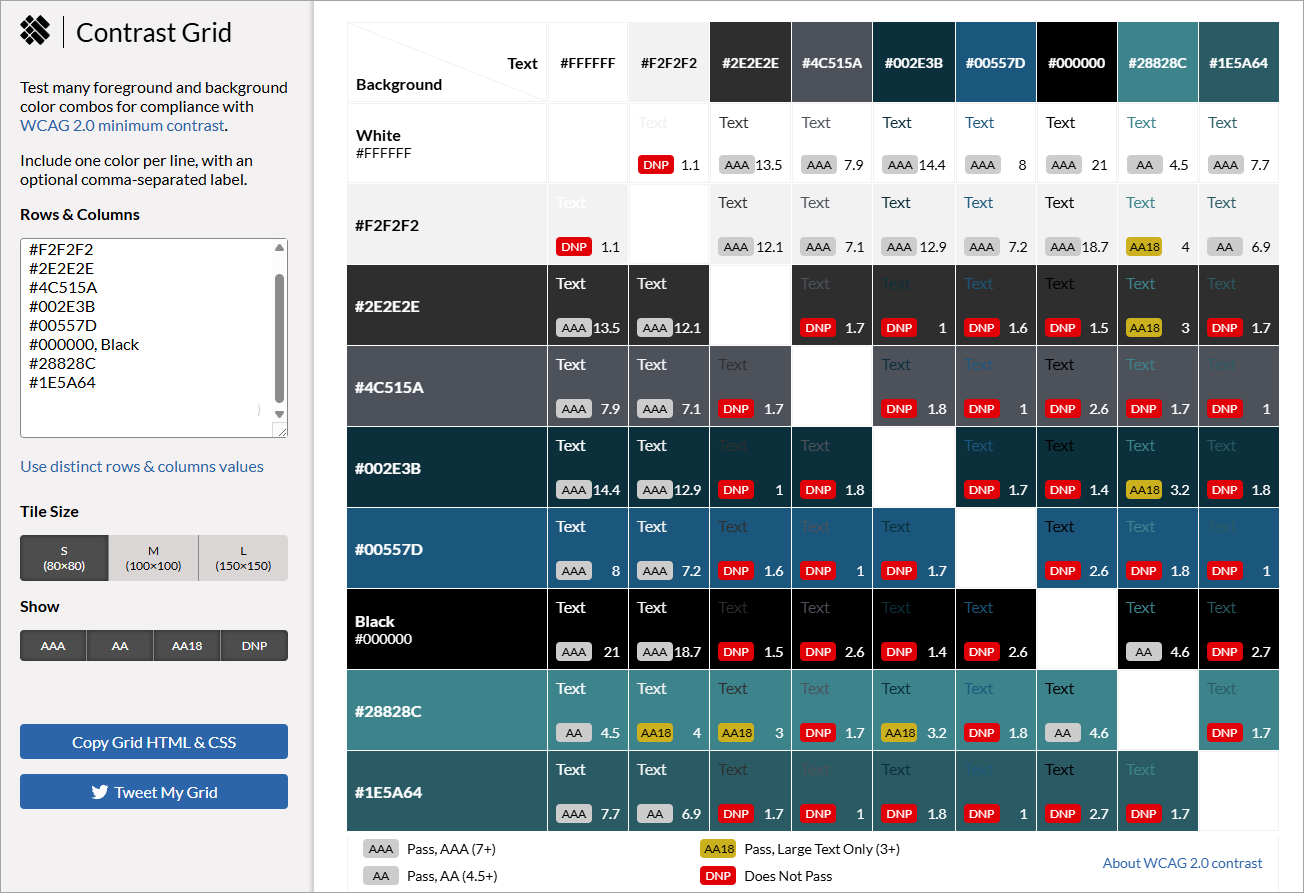
The EightShapes Contrast Grid used to test foreground and background colour combinations against WCAG colour contrast requirements.
The left-hand panel contains the controls, including the hex colour values from eLaHub’s brand guidelines, tile-size options and filters for different conformance results.
The main area contains a comparison grid. Each row represents a background colour and each column represents a text colour. The cells show sample text, the calculated contrast ratio and a status label. Grey labels indicate combinations that meet ‘AA’ or ‘AAA’ requirements, yellow labels identify combinations suitable for large text only, and red ‘DNP’ labels show combinations that do not pass.
Colour contrast is one of the accessibility requirements that Learning and Development teams are most likely to be familiar with. However, it still appears frequently in our audits. This is usually because contrast has not been checked consistently across all parts of the learning content, including brand colours, interactive elements, images, video and keyboard focus indicators.
Common issues include:
- Brand colour combinations that have not been checked against minimum contrast requirements. Tools such as the EightShapes Contrast Grid can help teams identify which colour combinations work
- Buttons, controls and other non text items that do not have enough contrast against their background.
1.4.11 Non-text Contrast – Level AA - Text placed over background images or included within video content that does not meet minimum contrast requirements.
1.4.3 Contrast (Minimum) – Level AA - The focus indicator for keyboard navigation does not have sufficient contrast against background throughout the learning content
1.4.11 Non-text Contrast – Level AA
These issues can make it harder for learners to read content, identify controls, see where they are on the screen or complete interactions successfully.
2. Images of text used without accessible alternatives
Images of text are a common issue in eLearning, particularly in diagrams, process graphics and infographics. This happens when text is included inside an image file, such as a JPEG or PNG, rather than being added directly to the page as text.
1.4.5 Images of Text – Level AA
Using images of text can create several barriers for learners:
- Screen reader users may not be able to access the text at all. If the text is embedded in an image and an appropriate text alternative has not been provided, the screen reader may miss the information completely.
- Learners with vision access needs may find the text harder to read when they use browser zoom or screen magnification software. Unlike real text, text in an image can become pixelated when enlarged.
- Learners with cognitive access needs may be prevented from using browser plug ins or third-party tools to customise the text. For example, they may not be able to adjust spacing, change fonts, modify colours or apply other reading support settings to text that is embedded in an image.
To make images of text more accessible, learners need access to the information in a text-based format. Alternative text can support screen reader users, but it does not fully address the barriers created by images of text. It does not help learners who need to enlarge the text without pixelation, or learners who use browser settings, plug ins or third-party tools to customise text appearance. For this reason, our recommended approach is to provide a full text version of the information alongside the image. For example, in Rise 360 this could be added beneath the image using an accordion block, so learners can access, resize, copy or adapt the information in the way that works best for them.
AI tools can be very helpful in creating a first draft of this text-based version, especially for complex diagrams, infographics or process graphics. However, the output should always be reviewed by someone who understands the learning content, to make sure it is accurate, complete and written in a way that supports the intended learning outcome.
3. Headings are incorrectly applied or structured
Headings provide structure for digital learning content. For learners who use assistive technology including screen readers, this structure is especially important because it helps them move between sections, recognise how the content is organised and find information more effectively.
1.3.1 Info and Relationships, Level A
In some authoring tools, heading levels are applied automatically through the template or block structure. In other tools, authors may need to apply heading styles manually. In both cases, it is important to check that the visual heading structure matches the underlying structure available to assistive technology.
Common issues include:
- Text is presented visually as a heading, for example through larger text or bold styling, but no heading style has been applied. This means screen reader users may not be able to identify it as a heading or use it to navigate the content.
- Heading styles are applied to text that is not actually a heading. This can create a confusing structure for screen reader users and make the content feel less predictable.
- Heading levels do not reflect the logical hierarchy of the content. For example, a lower-level heading may be used where a higher level heading would be more logical, or the heading structure may not match the way the content is organised.
- Heading levels are skipped. For example, a Heading 1 is followed by a Heading 3, with no Heading 2 between them. This can cause confusion for screen reader users and may make them think they have missed important content.
Getting heading structure right can make a significant difference for learners who use assistive technology. It helps ensure that headings are used consistently and accurately, so the structure of the content can be recognised, followed and navigated. But in our experience, it also improves the structure for everyone. By thinking about how content is organised and structured for learners who use assistive technology, it also helps practitioners to organise the content more clearly, break text into manageable sections and make it easier for all learners to skim, scan and find the information they need
4. Captions are missing, inaccurate or incomplete
1.2.2 Captions (Prerecorded) – Level A
Captions are essential for learners with hearing access needs, as they provide access to spoken content and important audio information in prerecorded video.
Although automatically generated captions are now common and increasingly accurate, they still need to be checked. Captions must be accurate, synchronised with the audio and descriptive enough to provide an equivalent experience. This means checking for spelling errors, missing words, incorrect punctuation, poor timing and any content that has been misunderstood by the captioning tool.
Captions should also include important sound effects or audio cues that are needed to understand the meaning of the content. For example, if a sound effect, music cue, change in tone or off screen speaker provides important information, this should be included in the captions.
Common issues include:
- No captions are provided for prerecorded video content.
- Automatically generated captions are used without being checked or corrected.
- Captions contain spelling, punctuation or timing errors that affect meaning.
- Important sound effects or audio cues are missing from the captions.
5. Audio description is missing for important visual information
1.2.5 Audio Description (Prerecorded) – Level AA
Audio description supports learners with vision access needs by providing access to important visual information that is not available through the main audio track.
This is particularly important when videos include visual content that learners need in order to follow the meaning of the video. For example, a speaker may refer to a graph, diagram, process, animation, demonstration or on screen text without explaining it fully in the narration. If that visual information is not described, learners with vision access needs may miss content that is important to the learning.
Common issues include:
- On screen names, titles or role information are shown visually but not spoken.
- Important text appears on screen but is not included in the narration.
- Graphs, charts, diagrams or visual examples are discussed but not described clearly.
- Demonstrations, processes or actions are shown visually without enough verbal explanation.
- Visual changes, such as animations or highlighted areas, are used to explain a point but are not described.
When reviewing video content, it is important to check both captions and audio description. Captions provide access to audio information. Audio description provides access to visual information. Both are needed to ensure learners can access the full meaning of the video content.
Acting on audit findings
One of the most important parts of an accessibility audit is how it supports teams to act on the findings. The audit report should not simply identify issues. It should help teams understand what to fix, why it matters and how changes can be implemented in a realistic and effective way.
At eLaHub, this is an important part of our audit process. Once the initial audit findings have been drafted, we always follow up with a meeting to discuss the report with the team. This provides an opportunity to talk through the findings, answer questions and explore any tool, system or organisational constraints that may affect the remediation options. These conversations are invaluable because they help ensure that the final recommendations are practical, appropriate and achievable.
It may not be possible or practical to resolve everything identified in an audit at once. What matters is that the findings are used to support measurable and consistent improvement. This means teams can use the audit to:
- Prioritise high impact fixes by looking first at the issues that have the greatest effect on learners with a wide range of access needs, then reviewing the remediation options and considering what is practical to change within the learning resource.
- Identify common issues and patterns, so they can be prevented in future development rather than repeatedly fixed after content has been built.
- Review existing workflows to identify where accessibility considerations can be introduced earlier in the design and development process.
- Build internal capability through training and support, so teams feel more confident testing, fixing and improving learning content over time.
When used in this way, an audit becomes more than a record of accessibility issues. It becomes a practical tool for improving current learning content and improve the accessibility of future development.
The shift left approach – embedding accessibility early
An important way that an audit can improve the accessibility of future development is often described as the ‘shift left’ approach. This approach describes how, instead of relying on an audit at the end to identify issues after the content has already been built, accessibility is considered from the start. This matters because accessibility issues are much easier, quicker and often cheaper to address when they are identified early. It also means that design decisions can be made with accessibility in mind from the outset, rather than adjusted later when templates, interactions, visual design or technical choices may already have been made.
Microsoft has been a strong advocate of this approach for many years. Its article Shifting left to get accessibility right at Microsoft, explains how addressing accessibility earlier can reduce testing and development time. According to Jia Ma, Senior Product Manager on the Accessibility Team at Microsoft Digital (MSD), the organisation’s internal IT team:
‘With the work completed by MSD teams so far, we project that our organisation will save as many as 2,000 development hours over the next six months. Using Accessibility Insights and talking accessibility early in the process is reducing the amount of accessibility testing we need.’
For learning teams, the principle is the same. When accessibility is considered earlier, the result of the shift-left approach is:
• Reduced rework
• Faster development cycles
• More consistent quality
• Better learning outcomes
“Auditing still plays an important role, but it becomes part of a wider system of quality assurance, rather than a final checkpoint at the end of the process.”
Incorporating accessibility testing into the development workflow can also be more straightforward than many teams expect, once they have a sound accessibility foundation and a working knowledge of the WCAG standards.
Building internal capability in accessibility
Although audits are useful for identifying accessibility issues, they do not solve the underlying capability gap that often exists within L&D teams. If teams do not have a shared understanding of accessibility, the same issues are likely to continue appearing across future projects. It also becomes much harder to adopt a shift left approach, because accessibility cannot be embedded earlier in the process if practitioners are not confident about what to look for, why it matters or how to apply it in everyday learning design decisions. This is why capability building is so important.
“Accessibility needs to move beyond being the responsibility of one specialist, one reviewer or one final audit. It needs to become part of the way learning teams think, design, develop, test and maintain digital learning content.”
It is also important that learning practitioners understand how accessibility standards apply specifically to learning content created using authoring tools and learning platforms. The WCAG standards provide an essential technical foundation, but eLearning brings its own design decisions, constraints and risks. Practitioners need to understand how the standards apply to interactions, quizzes, media, branching, templates, screen layouts, navigation, feedback and learner progression. Without that context, accessibility can be interpreted too narrowly or applied in ways that remove useful learning activity, reduce interactivity or undermine the overall learning experience.
This is at the heart of the ethos behind the Designing Accessible Learning Content Programme. The programme was created to help L&D practitioners build the knowledge, confidence and practical skills they need to make accessibility part of their normal workflow. It recognises that most learning teams want to create accessible and inclusive learning, but they need clear guidance, realistic examples and practical tools that reflect the reality of how eLearning is actually designed and built.
Programmes like Designing Accessible Learning Content help organisations to:
- Develop confidence in applying accessibility standards
- Understand how accessibility connects to effective learning design
- Recognise common accessibility barriers before they are built into the content
- Make more informed decisions about layout, interaction design, media, language and learner support
- Integrate accessibility checks into everyday workflows
- Build a more consistent approach across teams, projects and suppliers
The aim is not to turn every practitioner into an accessibility specialist. It is to give L&D teams enough shared knowledge and practical capability to make better decisions from the start, ask better questions, test more effectively and know when specialist support may be needed.
When capability is developed in this way, accessibility becomes less dependent on late-stage correction and more embedded in the culture of learning design. This helps organisations reduce repeated issues, improve the quality of their learning content and create more effective and accessible learning experiences for everyone.
How teams can get started with accessibility testing
Once teams have started to build accessibility capability, they are in a much stronger position to apply that knowledge in practice. They can begin to review existing workflows, identify where accessibility checks should happen and decide which type of testing is most appropriate at each stage of design and development.
At eLaHub, we developed a testing matrix to support this process. It helps teams think about the different ways accessibility testing can be introduced into everyday workflows and how responsibility for testing could be shared across the team. Not every check needs to be carried out by the same person, or at the same point in the process. Some checks can be completed by learning designers, some by developers, some by reviewers and some by accessibility specialists.
The aim of the matrix is to make accessibility testing feel more practical and manageable. It helps teams move away from seeing testing as one large task at the end of development and towards a more structured approach where different checks are built in throughout the workflow.
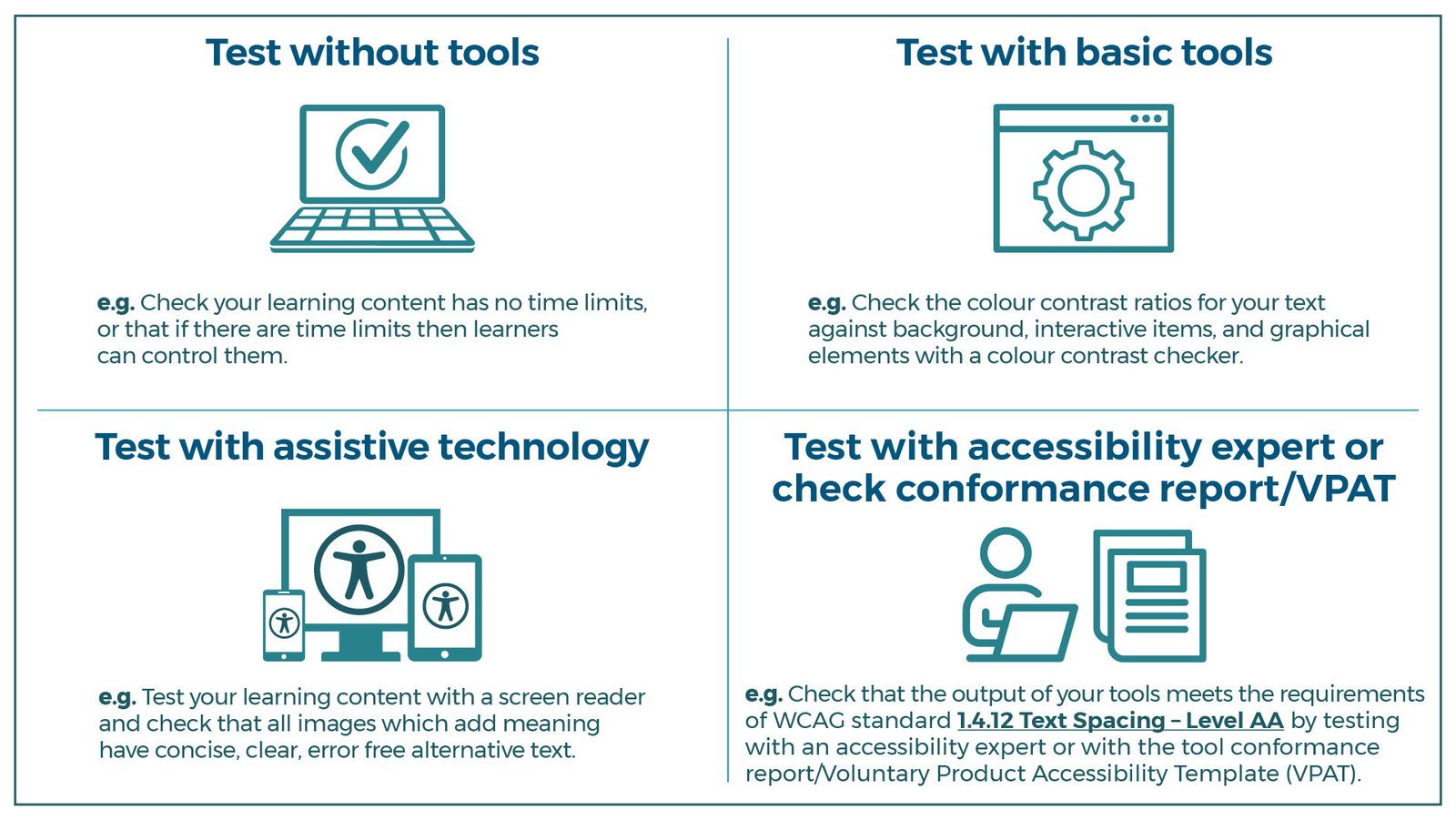
A four-part infographic showing different approaches to accessibility testing, arranged in a two-by-two grid.
Top left: Test without tools. An icon of a laptop with a tick above the keyboard. Text reads: “e.g. Check your learning content has no time limits, or that if there are time limits then learners can control them.”
Top right: Test with basic tools. An icon of a browser window containing a cog. Text reads: “e.g. Check the colour contrast ratios for your text against background, interactive items, and graphical elements with a colour contrast checker.”
Bottom left: Test with assistive technology. An icon of a desktop monitor, tablet and mobile phone, each displaying an accessibility symbol. Text reads: “e.g. Test your learning content with a screen reader and check that all images which add meaning have concise, clear, error free alternative text.”
Bottom right: Test with accessibility expert or check conformance report/VPAT. An icon of a person using a laptop beside a stack of documents. Text reads: “e.g. Check that the output of your tools meets the requirements of WCAG standard 1.4.12 Text Spacing – Level AA by testing with an accessibility expert or with the tool conformance report/Voluntary Product Accessibility Template (VPAT).”
Note: Automated accessibility testing tools are not included as a separate category in this matrix. This does not mean they are not useful. Automated tools can provide helpful support and can be a good starting point for identifying some accessibility issues. However, they should be used alongside manual review, assistive technology testing and expert judgement, rather than as a replacement for them. More information is included in the section ‘The limitations of automated accessibility testing’ later in this guide.
Testing without tools
There are many accessibility checks that can be carried out without specialist tools. These are often a good place for teams to start because they help practitioners build confidence and develop the habit of checking accessibility as part of everyday review.
Examples include:
- Checking that captions are accurate, synchronised and descriptive
- Reviewing transcripts to make sure they include all relevant spoken and audio information
- Ensuring link names are clear and meaningful
- Checking that instructions, guidance or knowledge checks do not rely on colour alone
- Making sure learners can pause, stop or hide moving, blinking, scrolling or auto updating content
Testing with basic tools
Some accessibility checks require simple tools that are easy for learning teams to use. These might include a keyboard, a colour contrast analyser, browser zoom or browser settings.
These tools can be used to check issues such as:
- Colour contrast, including items that may not be identified by automated tools
- Whether text can be resized or content reflows appropriately
- Whether the learning can be navigated using a keyboard alone
- Whether interactions can be completed without a mouse
- Whether the focus order is logical
- Whether there is a clear focus indicator when using the keyboard to navigate
Testing with assistive technology
Some checks require testing with assistive technology, such as a screen reader. For practitioners getting started, the free screen reader NVDA can be a useful option. However, screen reader testing can be confusing at first, so we recommend that practitioners take time to learn some basic commands and understand how screen reader users navigate digital content.
Screen reader testing can help check issues such as:
- Whether content is announced in a meaningful sequence
- Whether headings, lists, tables and other structures are presented accurately
- Whether buttons and interactive items have clear and consistent accessible labels
- Whether user interface components, such as buttons, checkboxes and quiz options, provide the information needed by assistive technology users
- Whether feedback, instructions and error messages are announced in a meaningful way
Testing with accessibility experts or an ACR
Some accessibility requirements relate to the underlying code or technical output of the authoring tool or learning platform. In these cases, testing may require input from an accessibility specialist, unless a comprehensive and reliable Accessibility Conformance Report, or ACR, is available.
For example, learning teams may need to know whether the published output of an authoring tool supports WCAG requirements such as 1.4.12 Text Spacing. If the team cannot access or change the underlying code, the issue may sit with the tool rather than the learning content itself.
This is why reviewing the ACR for an authoring tool or platform can be useful. It can help teams understand which accessibility features are supported, where known limitations exist and where supplier conversations or alternative approaches may be needed.
Testing learning content with users with lived experience of disability
Testing learning content with users with lived experience of disability helps ensure that usability and inclusion are considered alongside technical accessibility. This step can reveal issues that may not be identified through automated tools, manual checks or standard audit processes, because it shows how the content works for learners in practice.
Where possible, testing should include users with a range of access needs, so that the content is reviewed from different perspectives. This can provide valuable insight into the barriers learners may experience when navigating content, following instructions or completing activities.
User testing is particularly useful for:
- Reviewing clarity of instructions and language
- Checking consistency and predictability
- Identifying points where learners may become confused, blocked or unsure how to continue
- Understanding the impact of accessibility issues on the overall learning experience
At eLaHub, we find this type of testing especially valuable because it adds another layer of insight to the audit process. It helps us move beyond whether something technically works, and consider how it feels to use, where frustration may occur and how recommendations can better support learners in practice.
The limitations of automated accessibility testing
There are a range of automated tools that can be used to support accessibility auditing and testing during content development. Tools such as WebAim’s WAVE, Deques’ Axe DevTools or Google’s Lighthouse can be useful as a first pass check, helping to identify possible issues such as colour contrast for standard text against a background, missing or skipped heading levels, and whether images have alternative text.
Some authoring tools also include built in accessibility checkers. For example, the Storyline 360 accessibility checker currently supports 15 WCAG success criteria across multiple conformance levels, covering 24 accessibility issues.
However, automated accessibility checkers should always be used with caution. They can provide helpful support, but they cannot confirm whether learning content is fully accessible or whether it provides an effective learner experience. Automated tools may flag false positives or miss critical issues because they cannot fully assess context, meaning or usability. Similarly, built in authoring tool checkers may only identify a limited range of issues and can create a false sense of security if practitioners rely on them without a wider understanding of accessibility standards.
This is why automated testing must always be combined with manual review, assistive technology testing and expert judgement. Automated tools have their place, but they should be treated as one part of the testing process, not as evidence that learning content meets accessibility standards.
Using audits to measure accessibility maturity
Maturity models are useful because they help organisations understand where they are now and what needs to happen next. They provide a structured way to move from isolated fixes to a more sustainable accessibility strategy. Over time, this supports more consistent, scalable and effective learning.
For L&D teams, a maturity model can be used to assess how embedded accessibility is within learning design, development, testing and review processes. It can also help teams identify whether accessibility work is still largely reactive, or whether it is becoming part of everyday practice.
A formal accessibility audit can provide a valuable benchmark within this process. It helps organisations understand current accessibility performance, identify recurring issues and gather evidence about where improvements are needed. The findings can then be used to support planning, prioritisation, resourcing and measurement.
A maturity model such as the example below can help organisations assess progress and plan the next stage of their accessibility strategy.
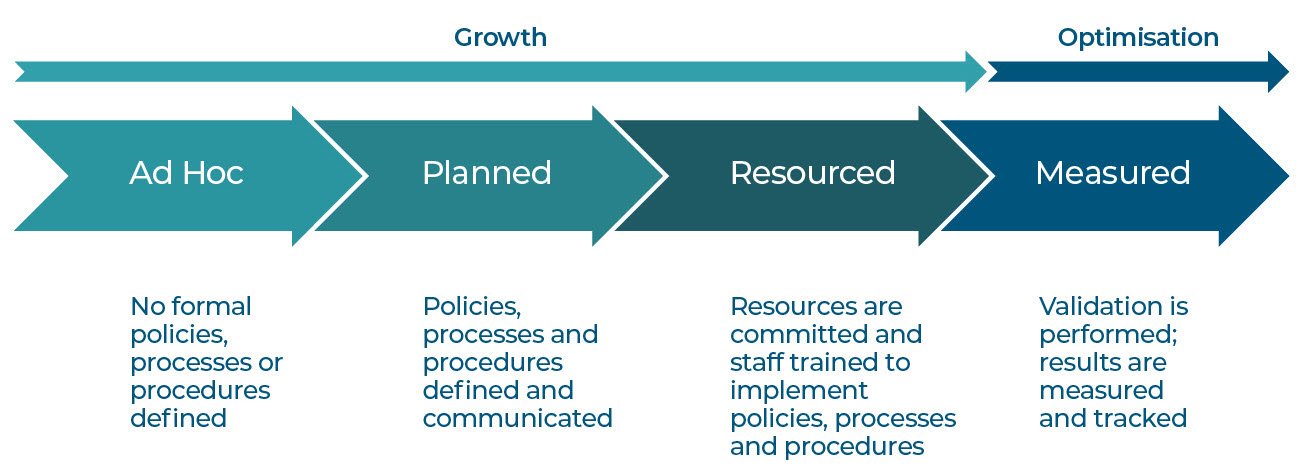
Ad Hoc
No formal policies, processes or procedures defined
An audit can identify the most urgent accessibility issues and provide a clear starting point for action. At this stage, accessibility work is often reactive and may depend on one or two people who are personally committed to improving accessibility.
Planned
Policies, processes or procedures defined and communicated
Audit findings can help teams define accessibility goals, agree priorities and document the processes or procedures needed to support more consistent practice.
Resourced
Resources are committed and staff are trained to implement policies, processes or procedures
An audit can help organisations identify where training, tools, budget, specialist support or additional capacity may be needed. It can also help teams make the case for investment by showing the scale and impact of recurring issues.
Measured
Validation is performed and results are measured and tracked
Audit findings can be revisited over time to check whether actions have been completed and whether accessibility improvements are being maintained. At this stage, organisations should be tracking progress, reviewing outcomes and using evidence to inform future decisions.
Used in this way, a maturity model helps teams turn audit findings into a clear plan for progress. It shows where accessibility practice is currently focused, where stronger processes or resources may be needed and how improvement can be measured over time. This helps accessibility move beyond individual fixes and become part of a more consistent, sustainable approach to learning design, development and review.
From compliance to learning excellence
“For Learning and Development teams, accessibility auditing and testing are now essential parts of effective digital learning design.”
They provide the evidence, structure and insight needed to understand where barriers exist, how those barriers affect learners and what needs to change. But their real value comes when they are used as part of a wider strategy for improving the quality of learning, rather than treated as a one-off compliance exercise.
When accessibility is embedded early, supported through capability building and measured over time, it becomes part of how digital learning is designed, developed and assured. It helps teams reduce rework, make better design decisions, create more consistent learner experiences and build confidence in applying accessibility standards in practice.
That is how accessibility moves from compliance to learning excellence.
How eLaHub helps organisations turn accessibility audit findings into practical improvement
Accessibility auditing and testing give organisations a clear understanding of where barriers exist within their eLearning and how those barriers affect learners. The greatest value comes from using the findings to set priorities, improve current content and inform the way future learning is planned, designed and developed.
eLaHub’s Accessibility Audits combine automated checks, manual testing and expert review to assess learning content against recognised accessibility standards. Findings are presented in clear, practical reports that explain the impact of each issue and provide guidance for remediation, helping teams focus their time and resources where they will make the greatest difference.
Our flagship Designing Accessible Learning Content Programme provides the foundation for acting on these findings. It gives learning professionals the practical knowledge and skills to understand accessibility barriers, make informed improvements and apply more accessible approaches in future projects. This helps organisations move from relying solely on individual audits towards developing consistent in-house capability.
eLaHub also supports this process through:
- Accessible Learning Consultancy, providing practical and strategic support to help teams interpret audit findings, prioritise improvements and embed accessibility into processes, standards and supplier requirements.
- Free Accessibility Assessments, offering an initial indication of potential accessibility barriers and helping organisations understand where more detailed investigation or support may be needed.
- Tailored Training for Teams, addressing specific issues identified through testing and helping different roles understand how their decisions contribute to the accessibility of learning content.
Together, these services create a connected route from assessment to action. Audits provide evidence of where barriers exist, while the DALC Programme, consultancy and tailored support help teams address those barriers and reduce the likelihood of similar issues being introduced in future content.
The impact of this approach can be seen in our work with:
Arts Council England, which combined eLearning accessibility audits with the DALC Programme. The audits identified barriers within existing content, while the programme helped the team improve its eLearning and establish clearer accessibility requirements for external providers.
BSI, which combined a detailed Storyline accessibility audit with the DALC Programme and Accessible Learning Consultancy. The audit provided practical findings and insight into learner experiences, while the wider support helped turn those findings into knowledge that could guide future eLearning development.
For further guidance, explore our ultimate guide to eLearning accessibility and our ultimate guide to shifting left, which examine how to create accessible learning and build accessibility into projects and processes from the earliest stages.