
Key takeaways
- Accessibility should begin with the design process. Considering access needs from the outset helps prevent barriers and reduces the time and cost of remediation later.
- WCAG provides the essential technical foundation. Learning practitioners also need to know how to interpret and apply the standards within real eLearning content, interactions and learner journeys.
- Accessible digital learning supports a wide range of people. This includes learners with vision, hearing, motor and cognitive access needs, alongside temporary and situational needs.
- Authoring tools cannot make learning accessible on their own. Learning teams need the knowledge to use accessibility features effectively, recognise tool limitations and make informed design decisions.
- Testing needs more than automated checks. Effective accessibility testing combines automated tools, manual review, assistive technology and feedback from people with access needs.
- Accessibility needs to extend beyond individual learning projects. Shared standards, accessible templates, quality assurance, procurement requirements and governance help make accessible practice consistent across an organisation.
- Building internal capability creates more sustainable progress. Giving learning teams practical accessibility knowledge helps them make better decisions, identify barriers earlier and apply accessibility more consistently.
- Accessible learning can improve the experience for everyone. Clear structure, straightforward navigation, accessible interactions and flexible content can make learning easier to access, use and apply.
What accessible and inclusive eLearning really means in practice
At eLaHub we often hear eLearning accessibility discussed in terms of technical standards or compliance requirements. Although these are important, they only represent part of the picture. To create accessible and inclusive learning in practice requires that every learner can perceive, understand, navigate and interact with learning content effectively, regardless of their access needs or the circumstances in which they are learning.
Accessibility focuses on removing barriers that prevent learners from accessing digital content. This includes ensuring that learning works with assistive technologies such as screen readers, providing captions for video, enabling keyboard navigation and structuring content clearly so that it can be understood by a wide range of learners etc. These practices are commonly guided by recognised accessibility standards such as the Web Content Accessibility Guidelines.
However, to create inclusive learning requires a further step to consider the overall learner experience. Does the design of the learning enable all learners to participate confidently and succeed? Inclusive learning design recognises that learners may approach content with different backgrounds, skills, languages, devices and environments. The use of clear structure, simple language, well designed interactions and thoughtful media choices, all contribute to a more inclusive experience.
For learning practitioners and managers, this means accessibility cannot be treated as a final technical check before publishing a course. Instead, it must be considered as part of learning quality from the very start of the design process. When accessibility and inclusion become a default part of learning design, the result is not just compliant content, but clearer, more effective learning that supports understanding, engagement and performance for all learners.

Why accessibility is now a core learning and business risk
“1.3 billion disabled people worldwide is not a niche. It’s a demographic megatrend”
Neil Milliken – Former Global Head of Accessibility Atos
Traditionally, learning and development teams have often viewed accessibility in digital learning as a niche design consideration. However, since the pandemic, organisations have become far more reliant on digital learning platforms to deliver training, onboarding and professional development at scale. Research shows that the rapid shift to online and hybrid working accelerated the adoption of eLearning across many sectors, making digital learning environments a central part of everyday work and development. This means that when those environments are not accessible, barriers are introduced for employees who need to access mandatory training, compliance programmes, and career development opportunities etc.
Legal expectations
Legal expectations are also increasing. In many countries, organisations have a clear responsibility to make sure their digital services, and workplace systems do not create barriers for disabled people. This means accessibility needs to be built into the way digital content, platforms and processes are designed, delivered and maintained, so that everyone can take part with confidence. In the UK, employers must consider their responsibilities under the Equality Act, while public sector organisations must comply with the Public Sector Bodies Accessibility Regulations. Similar legal expectations exist internationally, including under the European Accessibility Act in the European Union, the Accessible Canada Act in Canada and the Americans with Disabilities Act in the United States.
Organisational Risk
There are also reputational risks for organisations that promote diversity and inclusion but provide inaccessible learning experiences. This can quickly undermine their credibility with employees and external stakeholders.
Organisations also need to factor in a significant operational risk of escalated costs when accessibility is not considered during design. Learning teams may face repeated remediation work, delayed launches and inconsistent learner experiences across platforms.
All these factors mean that inaccessible learning creates a chain reaction of organisational risk, that learning and development teams must actively manage. Failure to address eLearning accessibility will impact compliance, employee experience, organisational reputation and the efficiency of learning teams themselves. Just as importantly, treating accessibility as part of learning quality from the start not only helps prevent these risks, but improves learning outcomes for everyone.
Who accessible and inclusive eLearning is for
To understand why accessible and inclusive eLearning design can improve the digital learning experience for everyone, it is helpful to consider the social model of disability.
The social model explains that people are not disabled by their condition alone. They are disabled by barriers created by the environment around them. In digital learning, those barriers are often introduced through design decisions, that impact a wide range of access needs.
Cognitive access needs may affect how learners process information, concentrate or remember instructions. Learners with dyslexia, ADHD or other neurodivergent profiles may face struggles with dense text, inconsistent navigation or cluttered screens. Introducing clear structure, simple language and predictable layouts can help remove these barriers.
Sensory access needs include visual and hearing differences. A learner who is blind may use a screen reader to navigate content. If the learning does not support access with a screen reader, this becomes a barrier they may face. Another example is learners who are deaf or hard of hearing who rely on captions, transcripts and visual cues to access audio content. If learning is designed without these considerations, this will impact their ability to complete learning effectively.
Motor access needs affect how learners interact with devices. Someone with limited dexterity or a repetitive strain injury may not be able to use a mouse effectively and therefore rely on keyboard navigation or voice input. Designing content that is not accessible with a keyboard will create barriers for these learners.
Temporary access needs can happen when someone is recovering from illness or injury, experiencing fatigue, or dealing with short-term health conditions that affect concentration, vision or hearing etc.
Situational access needs occur when the learning environment itself creates barriers. For example, a learner joining training from a noisy location may need captions, while someone accessing content on a small mobile device may struggle with complex layouts or tightly spaced interactions.
By recognising this wide range of access needs, learning teams can design courses that remove barriers before they occur. The result is learning that is clearer, more flexible and more effective for everyone.

Common misconceptions about accessibility in digital learning
Accessibility in digital learning is often misunderstood. Although many learning teams recognise its importance, they hesitate because of long-standing myths about what eLearning accessibility means in practice. Addressing these misconceptions is an important step towards building confidence and capability.
Myth 1. Accessibility limits creativity
One of the most common concerns that we hear from learning practitioners is that they feel accessibility restricts creativity or visual design. However, in reality, accessibility encourages clearer and more thoughtful design choices.
Well-structured layouts, meaningful visuals and clear navigation improve both usability and learning effectiveness.
Accessible design also does not prevent the use of multimedia, storytelling or scenario-based learning. It simply ensures that these elements can be accessed by a wider range of learners. For example, adding captions to a video allows learners who are deaf or hard of hearing to follow the content, while also supporting learners working in noisy environments or those who prefer to read along. Research shows that captions are widely used beyond their original purpose. A study by Verizon Media found that 80 percent of people who use captions are not deaf or hard of hearing.
Myth 2. Accessibility reduces interactivity
Another misconception is that accessible online learning must be simplified or stripped of interaction. In practice, accessible interactions are simply designed so that all learners can participate.
For example, drag and drop interactions that require precise mouse movement may create barriers for learners who use keyboard navigation or assistive technology. However, the learning objective can often be achieved through different interaction approaches such as selectable options, scenario-based questions or step by step decision activities. These alternatives can still be highly engaging while remaining accessible.
Accessible interaction design therefore focuses on learning outcomes rather than relying on a single type of interaction. It also supports learner preferences as well as access needs.
Myth 3. Accessibility is only for a small group of learners
Accessibility is often assumed to benefit only a small minority, but access needs are far more common than many organisations realise.
Research carried out by Boston Consulting Group (BCG) covering 28,000 employees in 16 countries, found that some 25% identified as having a disability or health condition that limits a major life activity. They explain that the gap between these figures and other estimates may be due to employees choosing not to disclose a disability.
“Employees with disabilities significantly underdisclose to their employers, perhaps fearing stigma or a negative impact on their job security or promotion prospects.”
This reluctance to disclose disabilities is a common theme. Add to this the learners that we have already discussed who are affected by temporary and situational access needs and the numbers rise further. This is why designing accessible eLearning ‘as the default’ can have such a significant overall impact.
Fundamentally accessible design benefits all learners by providing clearer structure, flexible formats and multiple ways to engage with content.
Myth 4. Accessibility is a final quality check
Finally, some teams believe accessibility can be addressed through a final review before a course is published. However, accessibility is most effective when it is considered at the outset and throughout the design process.
This is because decisions about layout, navigation, interaction design and media choices all influence accessibility. If these elements are not designed with accessibility in mind from the start, the result will be that significant rework may be required later.
It is these types of misconceptions that can make accessibility seem restrictive, whereas in practice, accessible learning design strengthens clarity, engagement and learning outcomes. When accessibility is understood as an essential part of learning quality rather than a technical constraint, it becomes a natural part of effective digital learning design.
As Patrice Pelland, partner software engineering director at Microsoft Digital, explains in Microsoft’s article, Shifting left to get accessibility right at Microsoft, considering accessibility from the start of a project can help teams identify issues earlier and avoid disruption later:
“It enables us to find accessibility bugs early, so at the end, major, disruptive bugs are few and far between. It enables us to ship experiences with accessibility in mind from the start, creating applications that are more inclusive for everyone, including those with disabilities. That’s why shifting left is so powerful. It allows you to avoid fire drills at the end of your projects.”

The relationship between performance, accessibility, and effective and impactful learning design
Accessibility, learning quality and performance are closely connected. When learning content is designed accessibly, many of the same principles that support learners with access needs also improve the learning experience for everyone.
Cognitive load
One important factor to consider is cognitive load. When digital learning contains cluttered layouts, inconsistent navigation or unclear instructions, learners must spend extra effort simply understanding how to move through the content. This unnecessary effort reduces the mental capacity available for learning itself. Accessible design helps reduce this cognitive burden by prioritising clear structure, logical sequencing and predictable navigation.
Clarity and Structure
Clarity and structure also play an important role. Well-organised headings, concise language and meaningful visual hierarchy help learners quickly understand the purpose of each section of content. When information is presented in a structured and consistent way, learners can focus on building knowledge rather than trying to interpret confusing layouts or instructions.
Feedback and interactions
The design of feedback and interactions also plays an important role in how effective the learning experience is. By creating accessible interactions, you ensure that learners can respond, explore and receive feedback in ways that work with different access needs, technologies and input methods.
Supporting learner preferences and access needs
Supporting learner preferences and access needs helps create a better learning experience. When learners can move through content smoothly, understand what is expected of them and receive clear feedback, they are more likely to stay focused and complete the learning.
Improved learner outcomes
Research across digital learning environments consistently shows that when barriers are reduced, learners are better able to achieve the intended outcomes, whether they are taking compliance training, developing workplace skills or taking part in professional development. Learner confidence also grows when people can access training independently and interact with the material in ways that work for them.
This all means that ultimately, accessible digital learning helps people make better use of the training they receive, apply it more confidently in practice and achieve the outcomes the learning was designed to support. It makes sense that when content is designed to be clear, focused and usable, learners are more likely to retain information and apply it in their work or studies. This is why at eLaHub we feel so strongly that accessibility strengthens the overall quality of learning design and helps give every learner the opportunity to succeed.
Accessibility in rapid authoring tools and learning platforms
Rapid authoring tools and learning management systems have transformed how organisations create and deliver digital learning. Tools such as Articulate Storyline, Rise, Adobe Captivate and Lectora can allow learning teams to develop courses quickly and distribute them at scale through learning platforms. However, although these technologies may include opportunities for teams to create learning resources quickly, more easily, and with more features, they also introduce specific challenges with regards to accessibility.
Understanding tool limitations
Learning teams need to understand the accessibility capability of their authoring tools, including what built-in features can and cannot do. Automated checkers and tools that generate accessible alternatives can be useful, but they should be treated as a starting point rather than a complete solution. Teams still need to make informed design decisions and review the quality of the output.
Templates can also help create more accessible courses, provided they are built accessibly from the start. If a template contains accessibility issues, those same issues are likely to be repeated across every course that uses it.
Impact of design choices
Whichever authoring tool is used, the way a course is designed, structured and configured has a significant impact on whether learners can navigate and interact with it successfully. Learning professionals therefore need a good working understanding of accessibility, so they can make informed design choices, spot potential barriers during development and create inclusive content as the standard approach.
System constraints
Authoring tools are only one part of the accessibility picture. The learning platform used to host and deliver content also has a direct impact on the learner experience. Even when individual courses are designed accessibly, the learning management system needs to support accessible navigation, keyboard access and compatibility with assistive technologies.
For this reason, accessibility should be a key consideration when organisations assess or procure any new authoring tool or learning platform.
A pragmatic approach
Even when accessibility issues or limitations are identified in existing authoring tools or learning platforms, however, changing them may not be realistic straight away. Introducing a new tool, training staff and implementing a new platform can all require significant time, budget and organisational change. At eLaHub, we recognise that accessible design needs to be applied pragmatically, taking account of the systems, resources and constraints each organisation is working with.
For learning teams, the key point is that eLearning accessibility needs to be part of the design process, rather than something left to a tool or system to resolve. When teams understand how their authoring tools and platforms work alongside accessibility standards, they can make better design decisions and create learning experiences that are efficient to produce, accessible and a good experience for all learners.
The Web Content Accessibility Guidelines (WCAG)
The Web Content Accessibility Guidelines (WCAG) are the internationally recognised standard for making digital content accessible. They were developed by the World Wide Web Consortium (W3C) through its Web Accessibility Initiative (WAI) to help ensure that websites, applications and digital content can be used by people with a wide range of disabilities and access needs.
The WCAG standards were created in response to the rapid growth of the internet and the recognition that digital technologies must be accessible to everyone. The guidelines provide a shared framework used by governments, organisations and technology providers worldwide.
The guidelines are built around four core principles. Digital content must be perceivable, operable, understandable and robust. These principles help designers and developers create content that works with assistive technologies, supports different ways of interacting with digital systems and provides clear and consistent user experiences.
Why creating accessible eLearning needs more than ‘top tips’
When learning professionals look for guidance on eLearning accessibility, whether through search engines, AI tools or online articles, the results often focus on tips, quick wins and useful starting points. These can help raise awareness, but they rarely provide the depth of guidance needed to create accessible and inclusive learning as the default.
The most up-to-date version of the guidelines, WCAG 2.2 includes 86 success criteria; applying them well requires more than a checklist or a generated answer. Learning practitioners and instructional designers need to understand how accessibility principles apply to the content, interactions, media and learner journeys they are creating. This is what enables teams to make confident decisions, meet accessibility requirements and design better learning experiences for everyone.
The WCAG guidelines were originally created for web content, so applying them to eLearning and digital learning experiences is not always straightforward. The standards can be complex and technical, and in a learning context they sometimes need careful interpretation to ensure accessibility is achieved while still preserving the quality and purpose of the learning experience.
When eLaHub founder, Susi Miller, first began exploring how to make her own learning content more accessible and inclusive, she found it difficult to find detailed guidance on how to apply accessibility standards in a learning context. This became one of the main motivations for creating eLaHub, a company dedicated to building accessibility knowledge and practice across Learning and Development.
As an instructional designer, Susi developed the eLa Framework to help her make sense of the WCAG standards and apply them practically to digital learning. The framework gave her a way to break down complex accessibility requirements, interpret them in a learning context and make design decisions that supported both accessibility and the quality of the learning experience.
She soon recognised that this approach would also be valuable for other learning practitioners who were facing the same challenge. The eLa Framework became the basis of her book, Designing Accessible Learning Content, and now underpins eLaHub’s award-winning Designing Accessible Learning Content Programme.
To ensure the programme supports inclusive practice as well as accessibility compliance, it also draws on guidance that goes beyond WCAG. This includes recommendations from sources such as the British Dyslexia Association, GOV.UK, higher education accessibility guidance and WebAIM, helping practitioners consider a wider range of learner needs when designing digital learning.
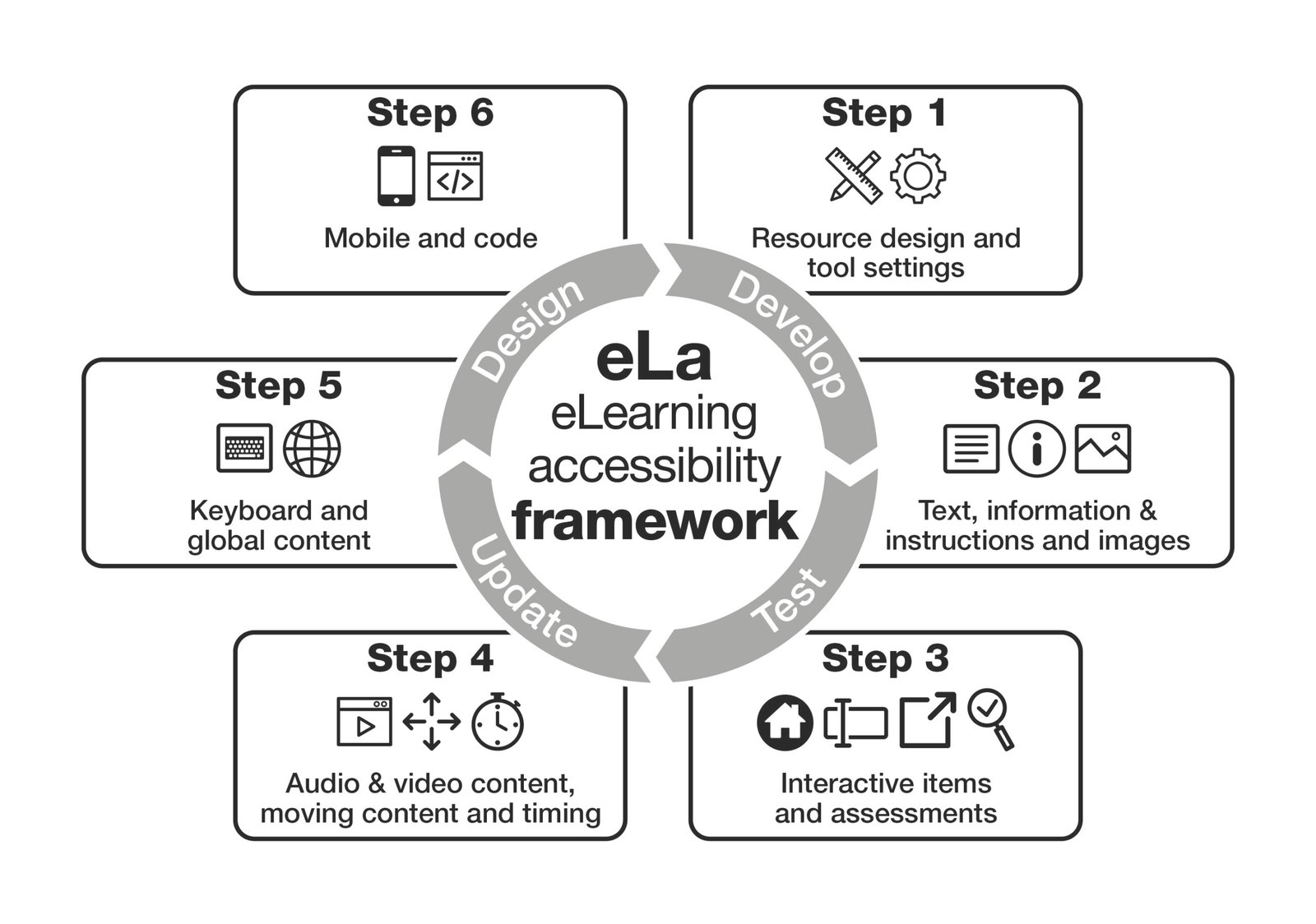
The image presents the ‘eLearning accessibility framework (eLa)’ in a circular process diagram with six labeled steps arranged around a central ring. The ring contains the words: ‘Design,’ ‘Develop,’ ‘Test,’ and ‘Update,’ indicating a continuous development cycle. Each step has a title and icon:
Step 1: Resource design and tool settings – represented by a ruler with pencil and a gear icon.
Step 2: Text, information & instructions and images – represented by icons of a text block, an info symbol, and a picture.
Step 3: Interactive items and assessments – represented by icons of a house, a list, and a magnifying glass checking a box.
Step 4: Audio & video content, moving content and timing – represented by icons of a video player, directional arrows, and a clock.
Step 5: Keyboard and global content – represented by a keyboard and a globe icon.
Step 6: Mobile and code – represented by a smartphone and a webpage with code brackets.
How to create more accessible and inclusive eLearning
As we have previously explored, creating accessible and inclusive learning as the default requires a solid grounding in the relevant accessibility standards, how they apply in a learning context and the wider considerations that help make learning more inclusive.
In this section, we provide some of the key accessibility and inclusivity considerations for learning practitioners and instructional designers. The guidance is organised around the same categories as the eLa Framework. This is designed to help practitioners move from broad accessibility principles to practical decisions about how learning content is structured, presented and experienced.
The importance of designing accessible and inclusive learning from the start
One of the most effective ways to create accessible learning is to make accessibility part of the standard design process from the start.
Many accessibility issues arise when accessibility is considered only after key design and development decisions have already been made. By that point, choices about structure, layout, interactions and media may be difficult or time-consuming to change. When accessibility is considered from the beginning, potential barriers can often be identified and avoided before they become embedded in the learning experience.
Drawing on our extensive experience of auditing eLearning, we have identified five key points for each category. These focus on the changes likely to have the greatest impact on the learning experience for everyone, including people with disabilities and access needs. They can also help learning practitioners save time, avoid common accessibility issues and reduce rework.
Resource Design
Make accessibility part of early design choices and this will reduce the need for costly remediation later and will have a significant impact on learner access and success.
- Use clear structure and hierarchy.
Organise content with meaningful headings, logical sequencing, manageable sections, spacing and consistent formatting so learners can understand how the content is arranged and find key information quickly. - Support accessible navigation.
Use consistent labels, instructions and navigation patterns so learners know where they are, what to do next and how to move through the resource. - Use clear, direct language that is appropriate for your audience.
Avoid unnecessary complexity so learners can understand the information and apply it more easily. - Check visual presentation.
Ensure sufficient contrast between text and background, and avoid relying on colour alone to communicate meaning. - Break content into manageable sections.
Present information in smaller, well-organised parts to reduce cognitive load and help learners process content step by step.
Tool settings
As well as making accessibility part of early conversations between learning designers, developers and subject matter experts, learning teams need to understand the accessibility capability of their authoring tools. This includes knowing what the tool can support, which accessibility features are available and where there may be limitations that impact design decisions.
- Look for an Accessibility Conformance Report.
Some authoring tool providers publish an Accessibility Conformance Report, or ACR, which explains how the product conforms to accessibility standards such as WCAG. This can be a useful reference when assessing tool capability, but it should not be treated as a guarantee that everything created with the tool will automatically be accessible. E.g: - Review global settings before development begins.
Some authoring tools include settings that affect the whole course or resource. For example, Rise includes a global setting to turn off entrance animations, which can help reduce distraction and support learners who may find movement difficult or uncomfortable. - Use templates carefully.
Many authoring tools allow teams to create templates, which can help support consistency across different learning resources. Consistency is important for accessibility because it helps learners understand how content is structured and how to move through it. - Make sure templates are accessible from the start.
Check areas such as colour contrast, heading structure, reading order, link text, button labels and interaction design. If a template contains accessibility issues, those issues are likely to be repeated across every resource that uses it. - Understand tool limitations before choosing interactions.
Some interactive activities may not be fully keyboard accessible or may not work well with assistive technologies. Where limitations exist, choose a more accessible interaction or provide an alternative way for learners to access the same content and complete the same task.
Text, information & instructions
Make deliberate choices about text size, fonts, structure, links and instructions, and this will help learners read, understand and navigate information while supporting those who use assistive technologies or adjust how content is displayed.
- Use a readable default text size.
Avoid very small text and check how content displays across different devices and screen sizes. - Choose clear, readable fonts.
The British Dyslexic Association recommends sans-serif fonts, but the priority is to avoid decorative or overly condensed fonts that may be harder to read. - Apply headings and lists using the styles provided by your authoring tool.
This helps communicate structure programmatically, so screen reader users and other assistive technology users can understand how the information is organised. - Use meaningful link text.
Avoid vague links such as ‘click here’ or ‘read more’ and make sure the link text describes the destination or action. - Use clear and consistent instructions throughout the learning.
Learners should understand what they need to do, how to do it and what will happen next.
Images
Consider how images communicate information, including their use of text, colour and contrast, and provide appropriate descriptions so learners can access their purpose and meaning in different ways.
- Avoid images of text.
Text presented as an image can be difficult to resize, customise or access with assistive technologies. It may also become blurred when magnified. Wherever possible, add text directly into the course or resource rather than placing it inside an image. - Do not convey meaning through colour alone.
For example, avoid using only a green overlay to show correct feedback or a red overlay to show incorrect feedback in a quiz. Use clear text labels, icons or other cues as well, so the meaning is available to everyone. - Ensure sufficient contrast between text and background.
This supports learners with reduced vision and helps improve readability across different devices and lighting conditions. - Provide appropriate alternative text for meaningful images.
The alternative text should communicate the purpose or meaning of the image in context. - Mark decorative images so they can be ignored by screen reader users.
Images that do not add meaning should not create unnecessary distraction for learners who use assistive technology.
Interactive items and assessments
Design interactive activities and assessments that learners can complete and review in different ways. Provide clear instructions, accessible feedback and enough time to complete each task.
- Make sure visible labels match the names available to assistive technologies.
For example, if a button has a visible text label which says ‘Start’, the accessible name should also be ‘Start’. - Make instructions for interactive activities clear and consistent.
Learners should know what they need to do, how to respond and whether they can try again, move back or review their answers. - Make feedback accessible.
Quiz and assessment feedback should not rely on colour alone, such as a green overlay for correct answers or a red overlay for incorrect answers. Use clear text feedback as well, so learners understand the result and what to do next. - Avoid time limits where possible.
If a timed activity is necessary, provide a way for learners to extend, pause or turn off the time limit unless the timing is essential to the learning outcome. - Check that interactive activities work well with assistive technologies.
Some drag and drop, hotspot, matching or sorting activities may create barriers. When necessary, choose a more accessible interaction or provide an alternative way for learners to complete the same task.
Audio and video content
Plan audio and video so learners can access spoken and visual information in different ways. Provide accessible alternatives and controls that allow learners to manage the media.
- Provide accurate, synchronised and descriptive captions for video content.
Captions should include spoken words and describe sound effects or changes in tone where these affect the meaning of the content. - Provide transcripts for audio and video content where possible.
Transcripts give learners another way to access the information, review key points and work through content at their own pace. - Describe important visual information.
Provide audio description or a descriptive transcript when this information is not explained in the narration or dialogue. - Make sure audio and video players are accessible.
Learners should be able to play, pause, stop, adjust the volume and move through the media using a keyboard and assistive technologies. - Do not start audio narration or video automatically.
This can be particularly problematic for screen reader users because the audio may clash with screen reader output.
Moving content, keyboard, timing and global considerations
Give learners control over movement and timing, and make sure they can operate and move through all content using a keyboard. Avoid effects that could distract learners or create a risk to their health
- Give learners control over moving content.
If movement is included, learners should be able to pause, stop or hide it, especially where it starts automatically or lasts for more than a few seconds. - Check that all functionality in the learning resource can be accessed and operated with a keyboard.
Learners should be able to move through content, open menus, select options, submit answers and complete activities without needing a mouse. - Make sure there is a clear ‘visible focus indicator’.
This shows keyboard users where they are on the page or screen as they move between buttons, links, form fields and other interactive elements. - Avoid flashing content.
Do not include content that flashes more than three times per second, as this can create a serious risk for some learners. - Avoid automatic transitions where possible.
Learners should have enough time to read, process and interact with content before it changes or moves on.
Mobile and code
Build learning that adapts across screen sizes and orientations. Use correct code so assistive technologies can identify the structure, purpose and state of content and controls.
- Check how content responds across devices and screen sizes.
Learning content should remain readable and usable when learners zoom in, resize text or use different devices, including mobile phones and tablets. - Avoid locking content to one orientation unless there is a clear reason.
Learners may need to use a device in portrait or landscape depending on their access needs, device setup or assistive technology. - Use correct heading levels.
Headings should follow a logical order and reflect the structure of the content, rather than being chosen only for visual appearance. - Make sure custom controls have the correct name, role and value.
If your learning includes custom-coded buttons, menus, sliders, tabs or other interactive elements, assistive technologies need to be able to identify what the control is, what it is called and its current state or value. - Make touch targets large enough and provide sufficient spacing.
Buttons, links and other controls should be easy to select on mobile devices without accidentally activating a nearby target.
Governance and quality assurance for accessible learning
Creating accessible and inclusive learning content cannot depend on individual effort alone. It requires clear governance, shared standards and consistent quality assurance processes across the learning team.
Although learning teams may develop accessible content successfully for individual projects, progress can be inconsistent when there are no shared standards or review processes in place. By embedding accessibility into governance, organisations can ensure that accessibility expectations are clear, repeatable and applied across all learning content.
One of the most effective starting points is to integrate accessibility into organisational learning standards. This may include specifying accessibility requirements in learning design guidelines, ensuring templates support accessible structure and navigation, and aligning development practices with recognised standards such as the WCAG standards. When accessibility is built into templates and design frameworks, many common barriers can be avoided from the outset.
Quality assurance processes are also essential. Learning teams should consider introducing accessibility checkpoints into existing review workflows, alongside checks for accuracy, branding and instructional quality. This helps identify issues before content is released and encourages continuous improvement over time.
Supplier management plays an equally important role. Organisations that commission external learning content should clearly specify accessibility requirements in procurement documents and contracts. Suppliers should be expected to demonstrate how their content meets accessibility standards and how accessibility is tested during development.
To make governance effective, organisations must invest in internal capability. Learning designers, developers, subject matter experts and reviewers need the knowledge and confidence to recognise accessibility issues and apply accessible design principles in their work. Awareness training and specialist capability building are therefore essential components of a sustainable accessibility strategy.
How to build internal accessibility capability
To create accessible and inclusive learning at scale requires organisations to invest in the knowledge and confidence of the people who design, develop and commission learning content. Learning teams need a strong foundation in accessibility before they can make consistent and sustainable progress towards more accessible and inclusive content.
To create accessible and inclusive eLearning at scale requires organisations to invest in the knowledge and confidence of the people who design, develop and commission learning content. Learning teams need a strong foundation in accessibility before they can make consistent and sustainable progress towards more accessible and inclusive content.
From our experience at eLaHub we know that when accessibility knowledge sits with only one or two people in a team, progress can be limited. Output can vary from project to project, teams become dependent on individual expertise, and common issues keep resurfacing. It is also difficult to make sure that everyone in a team is ‘on board’ with accessibility, which in turn makes it difficult to ensure that learning is developed with a consistent approach.
By developing a thorough baseline of accessibility knowledge across the whole learning team, it is much more likely that good practice will become part of everyday design, development and review.
Learning teams can also play an important role in wider organisational change. Learning often reaches people across the whole organisation, which creates a valuable opportunity to demonstrate best practice and show the tangible benefits of accessible learning content. By embedding accessibility into the way learning is designed, developed and reviewed, learning teams can help build awareness, influence digital practice and show what inclusive digital experiences can look like in practice. This is explored further in Digital Accessibility in the Workplace – eLaHub Ultimate Guide
Specialist structured training
Investing in structured, specialist accessibility training for learning teams is likely to provide the best return on investment, as it helps teams design accessibility into content from the start, reduce costly remediation work and create digital learning that is more consistent, inclusive and effective.
To achieve this, training needs to be specific to the learning context. Learning teams benefit most when they can explore how accessibility applies to the content, interactions, media, tools and platforms they use every day, and relate the guidance directly to their own design and development decisions.
eLaHub’s Designing Accessible Learning Content Programme is designed specifically to help learning practitioners and instructional designers develop a strong foundation in accessibility. Through more than 100 practical lessons, a structured framework, 12 months of access, online support, recognised accreditation and CPD, the programme helps teams build both knowledge and confidence.
The programme is focused on the realities of learning design and development. It helps teams apply WCAG 2.2 in real learning workflows, test and remediate content, and make informed accessibility decisions across different authoring tools. This supports a more sustainable approach, where accessibility becomes part of everyday practice rather than something addressed through one-off fixes.
For L&D teams, this helps new and existing team members develop shared foundations, use a common language around accessibility and create more consistent, accessible and inclusive learning over time.
Our experience shows that teams achieve the best outcomes when they take part in the programme together. A coordinated approach creates a shared learning experience and gives teams the opportunity to discuss ideas, address challenges and apply their knowledge as it develops.
Accessibility audits and assurance in learning
Accessibility audits can play an important role in building internal accessibility capability when they are used as part of a wider improvement process. They help organisations understand how well learning content performs in practice, identify barriers that may affect learners and prioritise the areas that need attention.
However, audits should not be treated as a complete solution. An audit can identify issues, but sustainable progress depends on teams being able to understand those issues, make informed decisions about how to resolve them and prevent similar barriers being built into future content.
This is where a more active approach to auditing can be valuable. External audits by accessibility specialists can help validate WCAG conformance for high-profile programmes, establish a baseline across an existing portfolio or identify common patterns across learning content. To support internal capability, the audit process should also help teams understand why issues occur and what practical remediation options are available.
At eLaHub, this is the approach we take through the ‘active auditing’ approach that we apply to our Accessibility Audits. As well as identifying eLearning accessibility issues, we provide guidance on remediation options so teams can learn from the findings and apply that knowledge to future projects.
Used in this way, audits become more than a quality check. They can inform training priorities, design standards, templates and quality assurance processes, helping teams improve existing content while reducing the likelihood of the same issues appearing again.
Testing learning content for accessibility and usability
Learning to assess content for accessibility is an essential part of building internal capability. It enables teams to review existing content more effectively and to check new learning resources before release, so accessibility and inclusion can be considered in practice rather than only in principle.
Automated tools can help identify some technical issues, such as missing alternative text or some colour contrast problems. However, they only detect a proportion of accessibility barriers and should not be treated as a substitute for manual review. A meaningful accessibility assessment also needs to consider how learners move through, understand and interact with the content, including learners using assistive technologies.
For the best outcomes, practitioners should combine automated checks, manual review and learner-centred testing. Practical checks might include:
- Navigate the course using only a keyboard to check whether all content, navigation and interactions can be reached and operated.
- Use a screen reader to review whether headings, buttons, links, instructions and feedback are announced clearly and in a logical order.
- Turn on captions and review video content to check accuracy, timing and whether relevant sounds are included where they affect meaning.
- Increase text size, zoom in or adjust display settings to check whether content remains readable and usable.
- Review content on different devices and screen sizes, including mobile phones and tablets.
- Test with colleagues or learners who have access needs to gather real feedback on barriers, usability and clarity.
Manual review is particularly important for checking areas that automated tools often cannot assess reliably, such as:
- Logical reading order and content structure.
- The clarity of instructions, feedback and language.
- The usability of interactions and activities.
- The accuracy, usefulness and context of alternative text.
- Whether assessment feedback is meaningful and available in more than one way.
- Cognitive load, confusing layouts or unnecessary complexity.
Testing becomes most effective when it brings together tools, human judgement and lived experience. This is explored further in our ultimate guide to eLearning accessibility auditing and testing.
Measuring progress and maturity in accessible learning practice
Building internal accessibility capability is an ongoing process. Learning teams need a clear way to understand their current level of practice, identify priorities and measure progress over time.
Benchmarking is a useful starting point. By reviewing a representative sample of existing learning content, teams can identify common accessibility barriers and establish a baseline. This helps highlight patterns, prioritise improvements and track whether changes are making a difference.
Maturity models can also help organisations understand how accessibility practice is developing. At an early stage, teams may rely on individual effort and reactive fixes. As practice becomes more mature, accessibility is built into design standards, templates, review processes and governance. Over time, the aim is to make accessibility a consistent part of how learning is designed, developed, reviewed and maintained.
Continuous improvement is essential. Learning teams should regularly review content, update standards and guidance, refresh training and use findings from audits, testing and learner feedback to improve future work.
Practical ways to support this include:
- Setting clear accessibility benchmarks aligned to recognised standards such as the Web Content Accessibility Guidelines.
- Reviewing a representative sample of learning content on a regular basis.
- Tracking common issues identified through testing, audits and quality assurance reviews.
- Using learner feedback and support requests to identify barriers that may not be picked up through technical checks alone.
- Updating templates, checklists and design guidance based on review findings.
- Reviewing whether accessibility is being considered at key stages of the design and development process.
- Providing ongoing training and support to maintain capability across the team.
By combining benchmarking, maturity models and continuous review, organisations can move from isolated improvements to a more consistent and sustainable approach to accessible online learning.
The future of accessible and inclusive online learning
Accessible and inclusive online learning is entering a period of significant change. Advances in technology are creating new opportunities to improve access, personalise support and make accessibility easier to build into everyday learning design. At the same time, they are also introducing new risks that learning teams need to understand and manage.
One of the most important developments is learning design supported by AI. AI tools can help learning practitioners generate ideas, structure content and create first drafts of learning resources. They can also support accessibility tasks, such as drafting alternative text, creating transcripts or simplifying complex content. Used well, this can improve efficiency and help reduce some common barriers.
However, AI should not be treated as a complete accessibility solution. As with automated eLearning accessibility testing, AI-generated content still needs human review. Learning teams need to check whether the content is accurate, inclusive, well-structured and appropriate for the learning context. Without this oversight, there is a risk that AI-generated interactions, poorly organised content or inaccurate accessibility alternatives could create new barriers for learners, including those using assistive technologies.
Other automated features are also becoming more common, including auto captions, voice input and adaptive interfaces. These developments can improve access, but they still need to be checked for accuracy, usability and learner experience. For example, captions need to be reviewed, voice features need to work reliably, and adaptive interfaces need to support learners without making assumptions about what they need.
Alongside these technological developments, global accessibility expectations are continuing to grow. Organisations are expected to meet recognised standards such as the Web Content Accessibility Guidelines, while also considering wider inclusive design practice. This includes cognitive accessibility, flexible formats, accessible interaction design and the needs of diverse global audiences.
The organisations that make the most progress will be those that combine technology with internal capability. Learning teams need the knowledge and confidence to use new tools responsibly, apply accessibility from the start and make informed decisions about what works for their learners. This is what will help organisations create online learning that is accessible, inclusive and ready for the future.
How eLaHub helps organisations embed accessibility across learning
Accessible eLearning works best when accessibility is considered throughout the learning content lifecycle, from the earliest planning and design decisions through to development, testing and maintenance. This allows teams to identify potential barriers sooner, when they are usually easier and less disruptive to address.
Since 2019, eLaHub has focused specifically on helping organisations make accessible and inclusive learning a practical part of everyday work. Our approach is grounded in purposeful progress, the development of in-house capability and the principle of shifting accessibility left.
By building accessibility into projects from the start, teams can find and resolve issues during design and development rather than discovering significant barriers during a final review. This reduces costly rework, avoids last-minute accessibility fire drills and helps organisations deliver learning experiences that are more inclusive for people with a wide range of access needs.
Our flagship Designing Accessible Learning Content Programme provides the foundation for this work. It gives learning professionals the practical knowledge and skills to plan, design, develop and test accessible eLearning with confidence. The programme combines structured development with opportunities to apply accessibility to real content, helping teams establish a shared approach that can be used consistently across projects.
eLaHub also supports organisations through:
- Accessible Learning Consultancy, providing practical and strategic guidance to help teams address complex accessibility challenges, improve processes and apply accessible approaches across learning portfolios.
- Tailored Training for Teams, focusing on the responsibilities, tools and workflows of particular roles or departments, including learning designers, developers, quality assurance teams and content owners.
- Accessibility Audits, assessing existing learning content to identify barriers, explain their effect on learners and provide clear priorities for improvement.
Together, these services help organisations address current accessibility issues while developing the capability to make better decisions in future projects. The DALC Programme establishes the shared foundation, with consultancy, tailored training and auditing providing additional support based on each organisation’s content, systems and priorities.
The impact of this combined approach can be seen in our work with:
Elucidat, which combined the DALC Programme with Accessible Learning Consultancy, Digital Accessibility in Action Training and Tailored Training for Teams. The programme established a shared foundation, while the wider support helped build confidence, improve product accessibility and influence customer guidance and practice across teams.
The University of Southampton, which used Accessible Learning Consultancy and accessible learning design and development support to improve learning for international students. Accessibility informed the design of a more inclusive and effective experience while also supporting wider innovation across the University.
For further guidance, explore our ultimate guide to eLearning accessibility auditing and testing and our ultimate guide to shifting left, which examine how to evaluate learning content and build accessibility into projects from the earliest stages.